# How to connect your wallet

*First, make sure that you have connected your wallet. If you've already connected a wallet.*

### Connecting your wallet

Step 1: Click on the "Connect Wallet" blue button in the top right corner.

<figure><img src="https://2146253292-files.gitbook.io/~/files/v0/b/gitbook-x-prod.appspot.com/o/spaces%2FHyhSiCXoxRpn79voKZ4f%2Fuploads%2FL8RjJ6GkvAi5ikqfcZnq%2FScreen%20Shot%202022-12-15%20at%2021.26.53.png?alt=media&#x26;token=5d4c5a2d-6027-4d9b-9827-61304de2b743" alt=""><figcaption></figcaption></figure>

When you connect your wallet, a few pop-ups will appear to facilitate wallet connection: in the first pop-up, you'll be able to:

* Choose from a list of wallets to connect to
* Obtain a wallet if you don't have one&#x20;

If you *don't* have a wallet, you can choose to create a wallet and connect:

<figure><img src="https://2146253292-files.gitbook.io/~/files/v0/b/gitbook-x-prod.appspot.com/o/spaces%2FHyhSiCXoxRpn79voKZ4f%2Fuploads%2FJo0K0WJo675tHY8OBIxO%2FPre%20Donation%20Input%209.png?alt=media&#x26;token=1e4356f8-bc63-4f64-90b0-96348110a274" alt=""><figcaption></figcaption></figure>

If you *do* have a wallet, you'll be able to connect your wallet by selecting it from the list.&#x20;

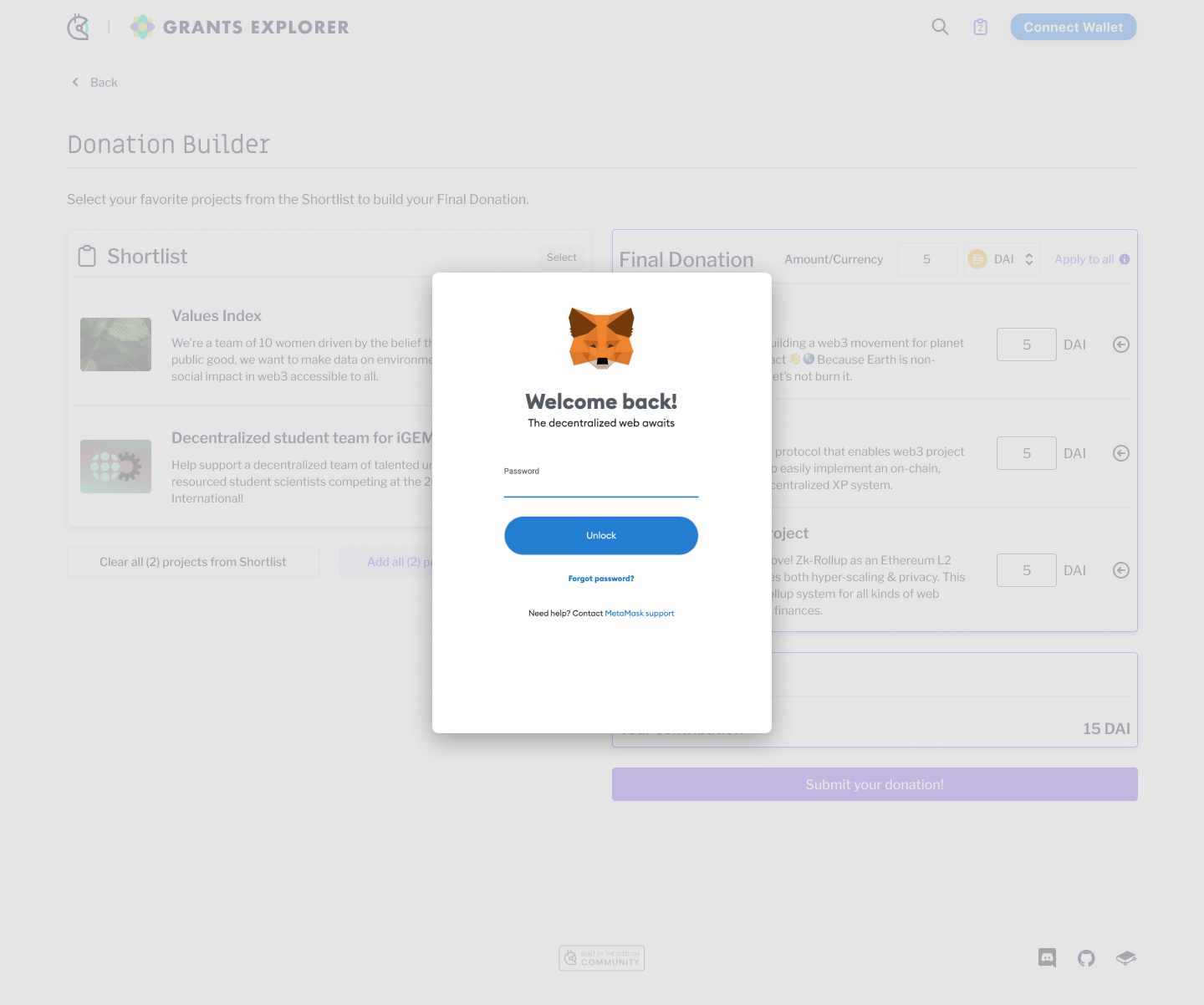
For example, if you hold a MetMask wallet, it'll look a bit like this:

* First, you must enter your password

<figure><img src="https://2146253292-files.gitbook.io/~/files/v0/b/gitbook-x-prod.appspot.com/o/spaces%2FHyhSiCXoxRpn79voKZ4f%2Fuploads%2F7kzJ2dmUpb6wleXYjlQ1%2FPre%20Donation%20Input%2013.png?alt=media&#x26;token=60e5e3e8-b9d3-4158-81db-ddb5d3e2fef9" alt=""><figcaption></figcaption></figure>

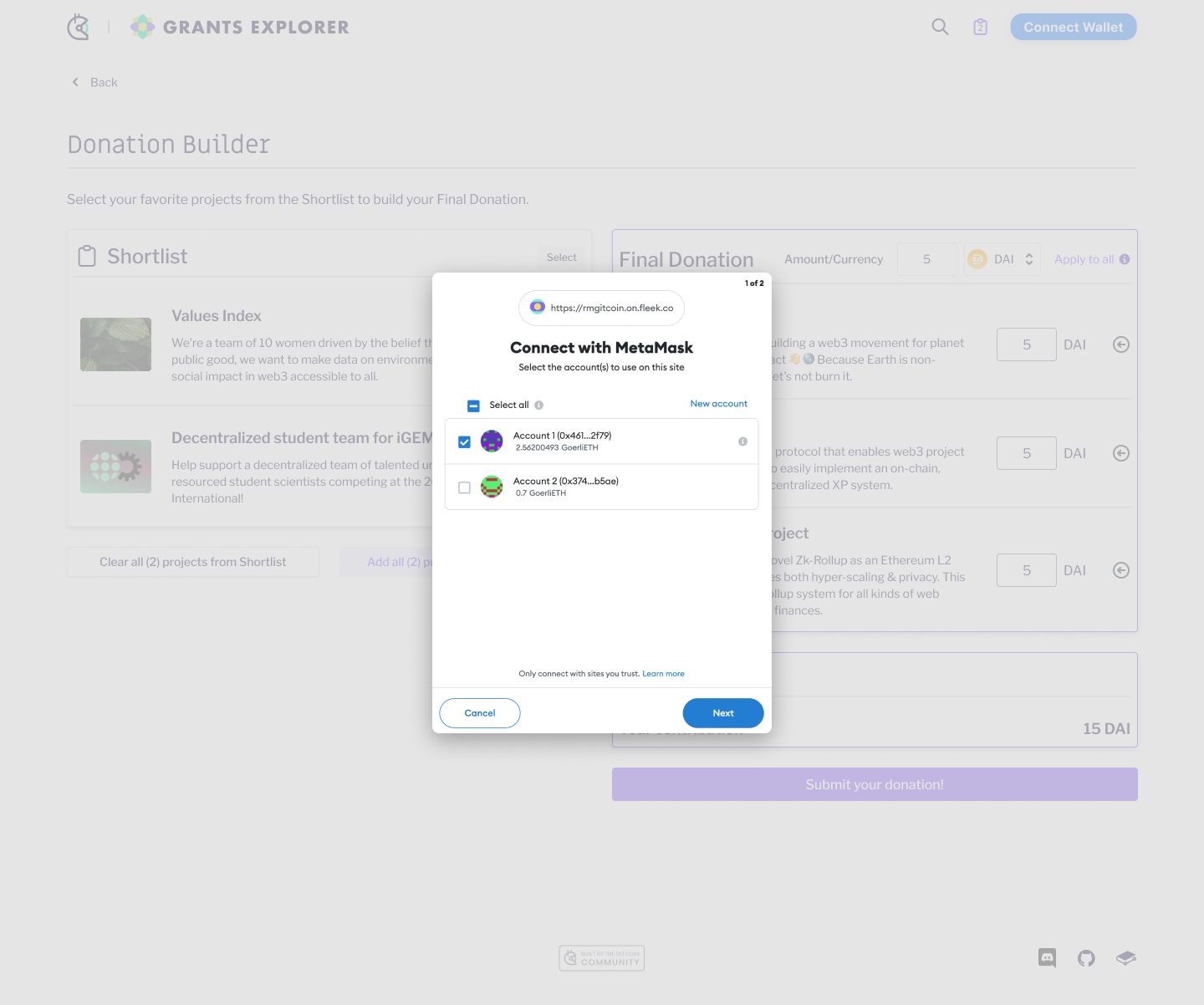
* Then, you must choose which account you'd like to connect

<figure><img src="https://2146253292-files.gitbook.io/~/files/v0/b/gitbook-x-prod.appspot.com/o/spaces%2FHyhSiCXoxRpn79voKZ4f%2Fuploads%2F3DoG1ct6PMXbkWo2kMzg%2FPre%20Donation%20Input%2011.png?alt=media&#x26;token=e647bf65-0428-4d96-8225-cec8c4f5ae3d" alt=""><figcaption></figcaption></figure>

* Finally, you must confirm and then connect

<figure><img src="https://2146253292-files.gitbook.io/~/files/v0/b/gitbook-x-prod.appspot.com/o/spaces%2FHyhSiCXoxRpn79voKZ4f%2Fuploads%2FJpQiA2BzYNT2PpP8QxxV%2FPre%20Donation%20Input%2012.png?alt=media&#x26;token=7fef04b0-3458-4d1f-b9d6-d157d44d103d" alt=""><figcaption></figcaption></figure>