# Guide to Unstaking Staked GTC Tokens via Etherscan with WalletConnect
## Prerequisites
* An Ethereum wallet (with WalletConnect compatibility) that holds staked GTC tokens.
* Sufficient ETH balance to cover transaction fees.
* Familiarity with Etherscan and using WalletConnect.
## Step-by-Step Unstaking Process
### 1. Visit Gitcoin Passport Staking App
Navigate to [staking.passport.gitcoin.co](https://staking.passport.gitcoin.co/StakeDashboard) and identify the round from which you want to unstake tokens.
### 2. Find Contract Address at the Bottom of the Page
Locate the "Identity Staking Contract" [link](https://etherscan.io/address/0x0E3efD5BE54CC0f4C64e0D186b0af4b7F2A0e95F) that leads to the Etherscan page for the contract associated with your staking round.
### 3. Connect to Etherscan
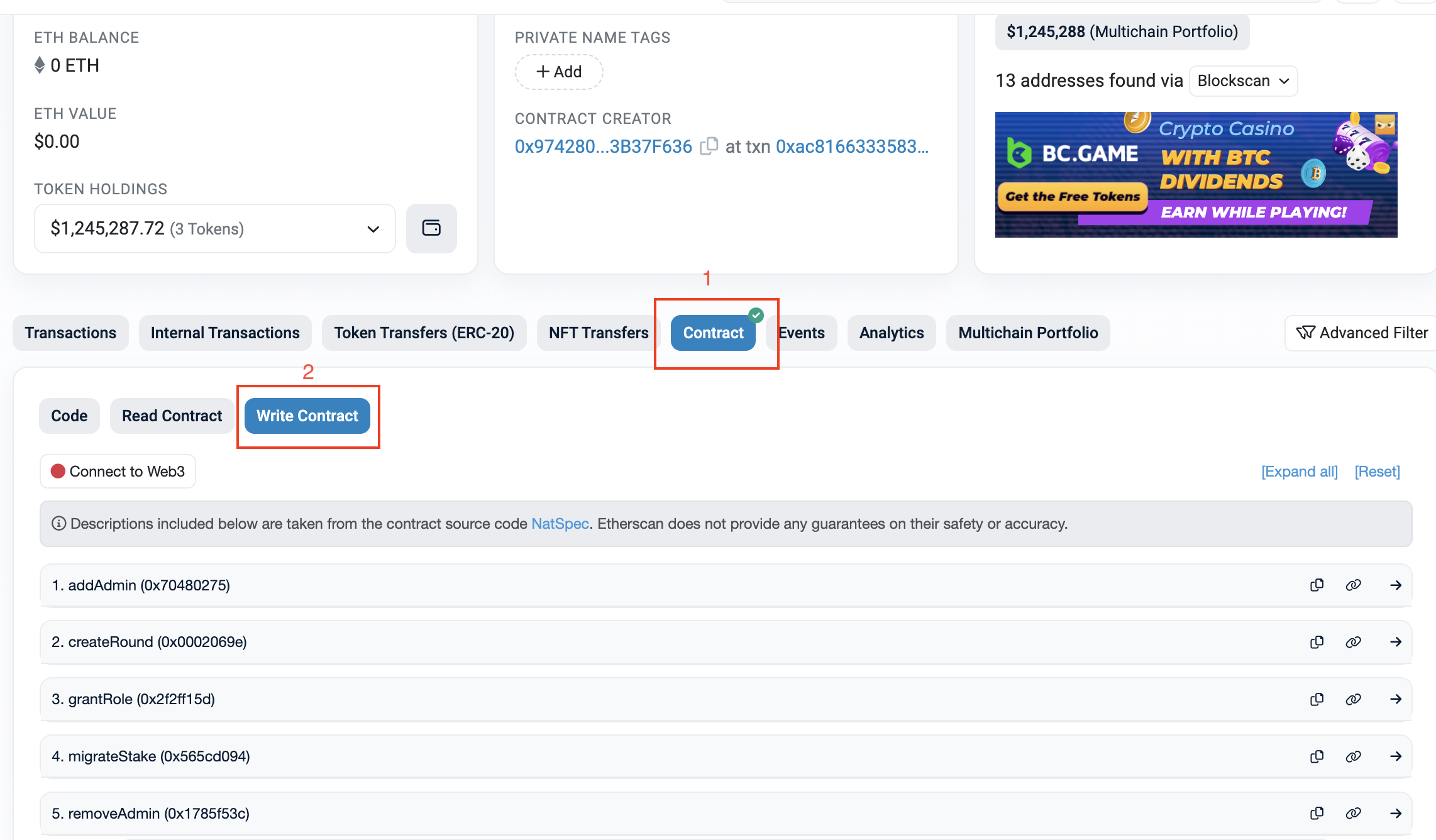
Click on the contract link, which will redirect you to the contract's page on Etherscan.
### 4. Interact with the Contract via WalletConnect
In the "Write Contract" tab on Etherscan, connect your Ethereum wallet using WalletConnect.
### 5. Choose the Correct Function
* Use unstake if you're unstaking tokens you've staked on yourself.
* Use unstakeUsers if you're unstaking tokens you've staked on other users.
### 6. Input Required Information
* For unstake: Enter the roundId and the amount you wish to unstake.
* For unstakeUsers: Enter the roundId and the addresses for whom you've staked tokens.
### 7. Execute the Transaction
Enter the details, click "Write", and confirm the transaction in your wallet.
### 8. Confirm the Transaction
Monitor the status of your transaction on Etherscan with the transaction hash provided.
## Appendix: Round ID Overview
| Round | Round ID |
| ----------- | ------------ |
| Season 20 | 5 |
| Season 19 | 4 |
| Season 18 | 3 |
| Beta Round | 2 |
| Alpha Round |
1
|
## Assistance
If you require further assistance or have any issues, please [contact Gitcoin support](https://support.gitcoin.co/gitcoin-knowledge-base/~/changes/u95K1LIg4EpcHUmS8Khm/about-gitcoin/contact-us).

 ### 5. Choose the Correct Function
* Use unstake if you're unstaking tokens you've staked on yourself.
* Use unstakeUsers if you're unstaking tokens you've staked on other users.
### 6. Input Required Information
* For unstake: Enter the roundId and the amount you wish to unstake.
* For unstakeUsers: Enter the roundId and the addresses for whom you've staked tokens.
### 7. Execute the Transaction
Enter the details, click "Write", and confirm the transaction in your wallet.
### 8. Confirm the Transaction
Monitor the status of your transaction on Etherscan with the transaction hash provided.
## Appendix: Round ID Overview
| Round | Round ID |
| ----------- | ------------ |
| Season 20 | 5 |
| Season 19 | 4 |
| Season 18 | 3 |
| Beta Round | 2 |
| Alpha Round |
### 5. Choose the Correct Function
* Use unstake if you're unstaking tokens you've staked on yourself.
* Use unstakeUsers if you're unstaking tokens you've staked on other users.
### 6. Input Required Information
* For unstake: Enter the roundId and the amount you wish to unstake.
* For unstakeUsers: Enter the roundId and the addresses for whom you've staked tokens.
### 7. Execute the Transaction
Enter the details, click "Write", and confirm the transaction in your wallet.
### 8. Confirm the Transaction
Monitor the status of your transaction on Etherscan with the transaction hash provided.
## Appendix: Round ID Overview
| Round | Round ID |
| ----------- | ------------ |
| Season 20 | 5 |
| Season 19 | 4 |
| Season 18 | 3 |
| Beta Round | 2 |
| Alpha Round |